Overview
Core Concepts Overview
Fastay is built on several foundational concepts that work together to provide a clean, intuitive developer experience. This section introduces these core concepts and explains how they interact to create a cohesive framework.
The Fastay Architecture
Fastay follows a layered architecture that balances simplicity with power:
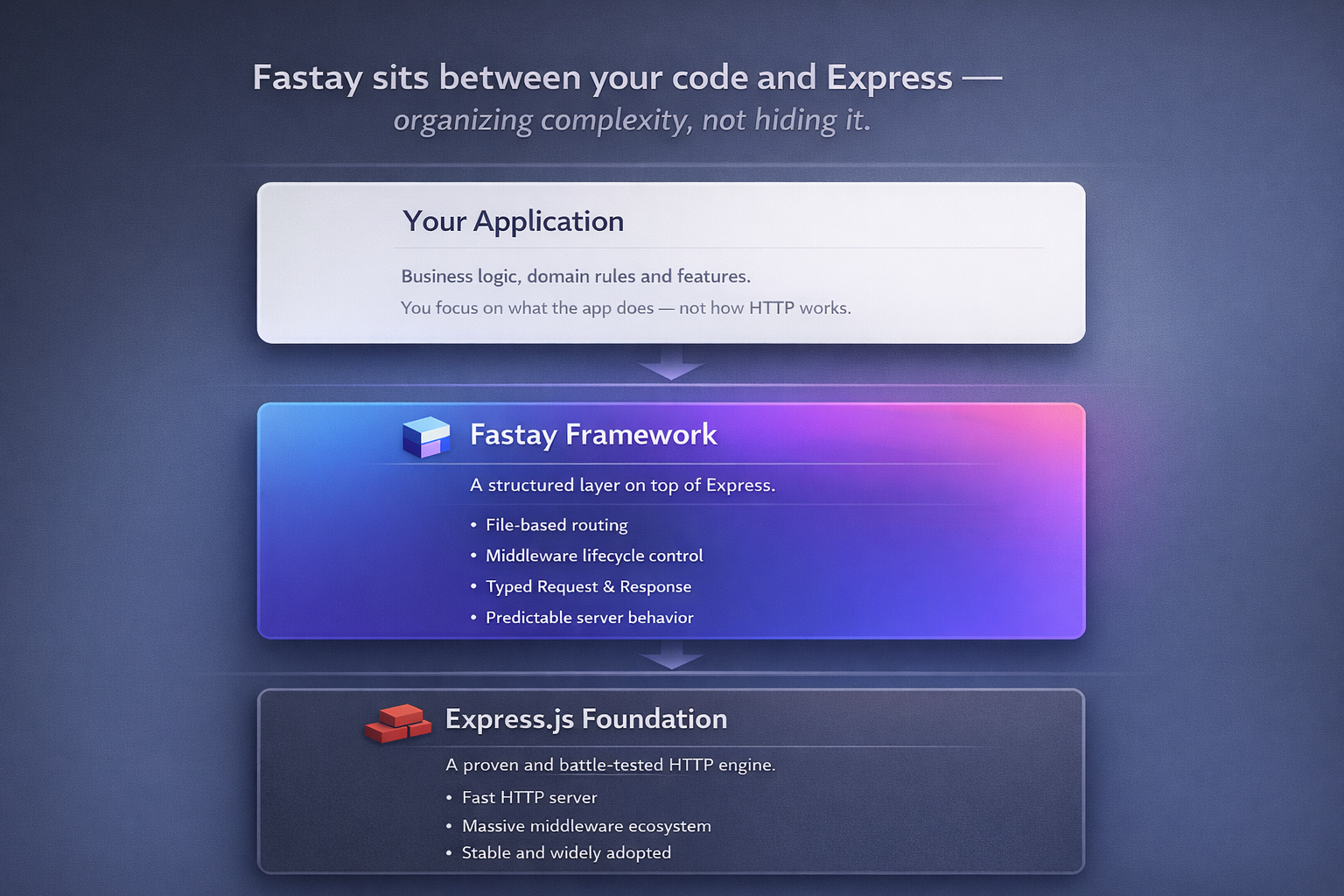
Key Architectural Decisions
-
File-Based Convention: Routes and middlewares are organized as files, making the project structure self-documenting and intuitive.
-
TypeScript First: Every component is designed with TypeScript in mind, providing excellent type safety and developer experience.
-
Progressive Enhancement: Start simple and add complexity only when needed. Fastay doesn't force you into complex patterns prematurely.
-
Express Compatibility: Full compatibility with the Express.js ecosystem ensures you can leverage existing knowledge and packages.
The Four Pillars of Fastay
Fastay's design rests on four interconnected pillars:
1. File-Based Routing
Routes are automatically discovered from your file structure. Each directory under src/api/ becomes an API endpoint, and each route.ts file defines the HTTP methods for that endpoint.
// src/api/users/route.ts → GET/POST /api/users
export async function GET() {
  /* ... */
}
export async function POST() {
  /* ... */
}

// src/api/users/[id]/route.ts → GET/PUT/DELETE /api/users/:id
export async function GET(req: Request) {
  /* ... */
}
export async function PUT(req: Request) {
  /* ... */
}
Key Benefits:
- No manual route registration
- Predictable URL structure
- Easy organization and navigation
- Automatic API documentation through file structure
2. Middleware System
Middlewares intercept requests before they reach route handlers. Fastay provides a clean, declarative way to apply middlewares to specific routes or route patterns.
// src/middlewares/middleware.ts
export const middleware = createMiddleware({
  "/api/admin": [requireAuth, requireAdmin],
  "/api/users": [requireAuth],
  "/api/public": [rateLimit],
});
Key Benefits:
- Route-specific middleware application
- Clear separation of concerns
- Reusable middleware functions
- Easy testing and debugging
3. Request/Response System
Fastay extends Express's request/response objects with additional conveniences while maintaining full compatibility.
// Enhanced request object
const { id } = req.params; // URL parameters
const { page } = req.query; // Query parameters
const body = await req.body; // Request body
const cookies = req.cookies; // Cookies

// Flexible response system
return { data: result }; // JSON response
return { status: 201, body: { id: 1 } }; // Custom status
return { redirect: "/dashboard" }; // Redirect
return { file: { path: "/file.pdf" } }; // File download
Key Benefits:
- Consistent API for all response types
- Type-safe request/response handling
- Built-in common patterns
- Express compatibility maintained
4. Error Handling
Fastay provides built-in error handling with sensible defaults that can be customized for your application's needs.
// Automatic error handling in development
export async function GET() {
  const data = await riskyOperation();
  return { data };
}

// Manual error handling with custom responses
export async function POST(req: Request) {
  try {
    const user = await createUser(req.body);
    return { status: 201, body: user };
  } catch (error) {
    return {
      status: 400,
      body: { error: error.message, code: "VALIDATION_ERROR" },
    };
  }
}
Key Benefits:
- Development-friendly error messages
- Production-safe error responses
- Customizable error handling
- Consistent error format
The Development Workflow
Fastay's core concepts support a smooth development workflow:
1. Project Initialization
npx fastay create-app my-project
cd my-project
npm run dev
2. Creating Features
# Add a new API endpoint
mkdir -p src/api/products
touch src/api/products/route.ts

# Add a new middleware
touch src/middlewares/auth.ts
3. Development
- Automatic file watching and hot reload
- TypeScript compilation with error reporting
- Development server with live updates
4. Testing
- Built-in test utilities
- Easy unit and integration testing
- End-to-end testing support
5. Deployment
- Build optimization for production
- Environment-specific configurations
- Multiple deployment targets supported
TypeScript Integration
Fastay is designed from the ground up for TypeScript:
Type Safety
import { Request } from "@syntay/fastay";

// Full type safety for request properties
export async function GET(req: Request) {
  // req.params is typed as Record<string, string>
  const { id } = req.params;

  // req.query is typed as Record<string, string | undefined>
  const { page = "1" } = req.query;

  // req.body can be typed with validation
  const userData = (await req.body) as UserCreateDto;

  return { id, page, user: userData };
}
IntelliSense Support
- Auto-completion for all framework APIs
- Type inference for common patterns
- JSDoc comments for all public APIs
- Source maps for debugging
Type Generation
- Automatic type generation for routes
- Type-safe middleware definitions
- Compile-time error checking
Configuration Philosophy
Fastay follows a "sensible defaults" approach to configuration:
Zero-Config Start
// Minimal configuration
import { createApp } from "@syntay/fastay";

void (async () => {
  await createApp({
    /* optional config */
  });
})();
Progressive Configuration
// Add configuration as needed
await createApp({
  port: process.env.PORT || 3000,
  apiDir: "./src/api",
  baseRoute: "/api/v1",
  expressOptions: {
    enableCors: {
      /* CORS config */
    },
    middlewares: [
      /* global middlewares */
    ],
  },
});
Performance Considerations
Fastay is designed for performance without sacrificing developer experience:
Startup Performance
- Minimal initialization overhead
- Lazy loading where appropriate
- Efficient route discovery
Runtime Performance
- Optimized request/response handling
- Efficient middleware execution
- Built-in performance best practices
Build Performance
- Fast TypeScript compilation
- Efficient bundling for production
- Tree-shaking support
Security First
Security is built into Fastay's design:
Default Security Headers
- Automatic security headers in production
- Protection against common web vulnerabilities
- Configurable security policies
Input Validation
- Type-safe request handling
- Built-in validation patterns
- Custom validation middleware support
Authentication & Authorization
- Flexible authentication system
- Route-based authorization
- Session management support
Extensibility
While Fastay provides a complete solution out of the box, it's also highly extensible:
Plugin System
- Custom middleware support
- Route transformers
- Response formatters
Express Compatibility
- Use any Express middleware
- Follow Express patterns
- Migrate existing Express apps
Custom Integrations
- Database adapters
- Authentication providers
- Monitoring and logging
Learning Path
To master Fastay, follow this learning path:
- Start Here: Understand the core concepts (this document)
- File Structure: Learn how Fastay organizes projects
- Routing: Master the file-based routing system
- Middleware: Learn to intercept and process requests
- Request/Response: Handle HTTP requests and responses
- Error Handling: Manage errors gracefully
- Advanced Topics: Explore performance, security, and extensions
Next Steps
Now that you understand Fastay's core concepts:
- File Structure: Learn about Fastay's project organization
- Routing: Dive into the file-based routing system
- Middleware: Explore Fastay's middleware capabilities
- Request/Response: Understand HTTP handling in Fastay
- Error Handling: Learn about Fastay's error handling approach
Each concept builds on the others to create a cohesive, productive development experience.
Understanding these core concepts will help you work effectively with Fastay and leverage its full potential for your projects.