Fastay Guides: Master Modern API Development
Welcome to the Fastay Guides section! This collection of practical guides will take you from building your first API with Fastay to implementing advanced patterns for production-ready applications. Whether you're new to backend development or an experienced engineer looking to adopt Fastay, these guides provide step-by-step instructions, real-world examples, and best practices.
What You'll Learn
The Fastay Guides are organized to take you on a progressive learning journey:
1. Getting Started
- Creating Your First API: Build a complete CRUD API from scratch
- Understanding the Core Concepts: Master routing, middleware, and request/response patterns
2. Essential Skills
- Authentication & Authorization: Implement secure user authentication with JWT, sessions, and OAuth
- Database Integration: Connect to PostgreSQL, MongoDB, or any database with proper patterns
- Testing Strategies: Write comprehensive tests for your Fastay applications
3. Advanced Patterns
- Migration from Express.js: Transition your existing Express applications to Fastay
- Production Deployment: Deploy your Fastay apps to various platforms
- Performance Optimization: Build high-performance APIs that scale
4. Practical Recipes
- Common API Patterns: Ready-to-use solutions for everyday problems
- Error Handling Strategies: Robust error management for production
- API Versioning: Strategies for evolving your API without breaking changes
Guide Progression Path
Follow this recommended path to master Fastay development:
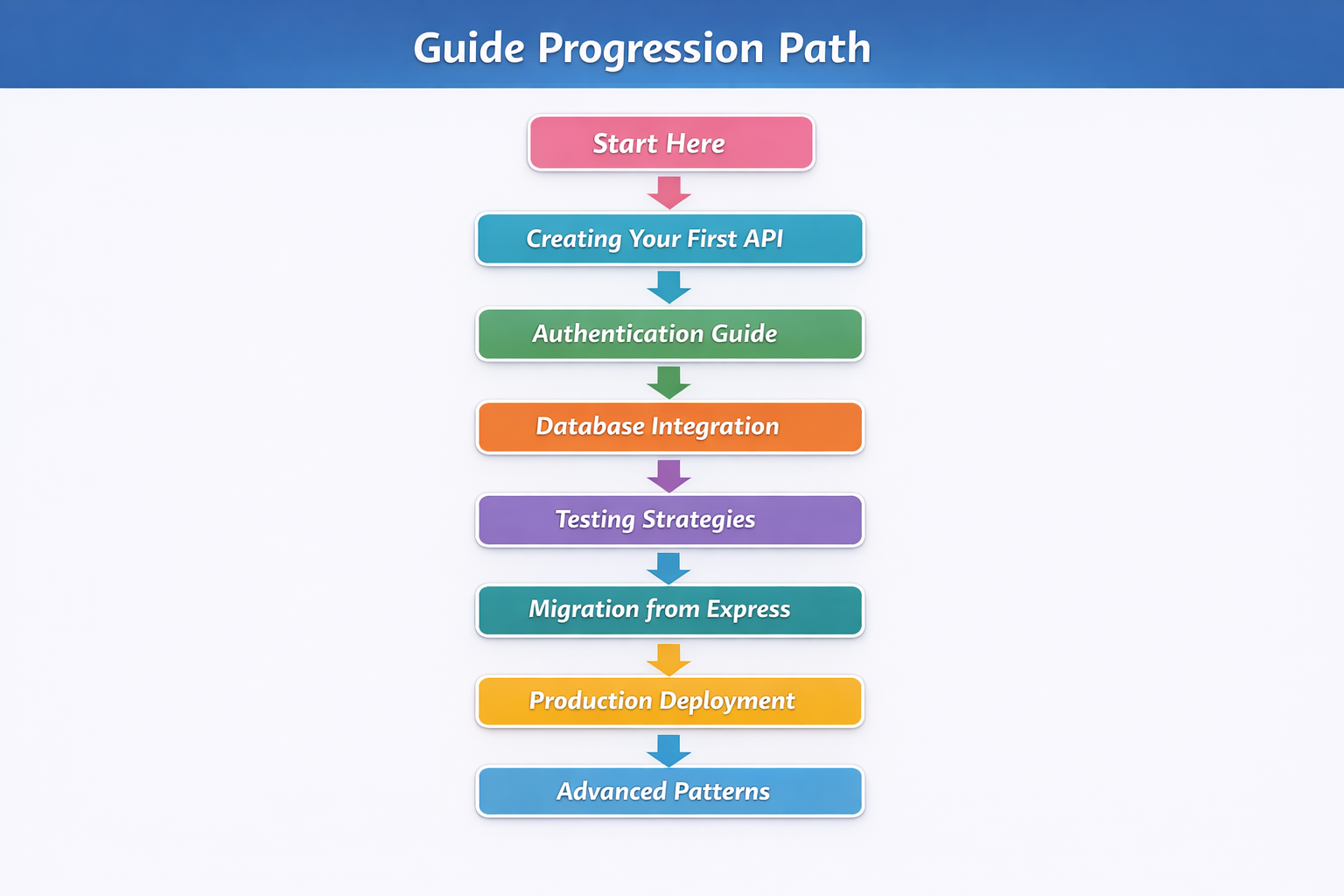
Beginner Track (Weeks 1-2)
- Week 1: Complete the "Creating Your First API" guide
- Week 2: Implement authentication and connect a database
Intermediate Track (Weeks 3-4)
- Week 3: Add comprehensive testing and migrate existing projects
- Week 4: Deploy to production and implement monitoring
Advanced Track (Week 5+)
- Week 5+: Explore advanced patterns, performance optimization, and microservices
Who These Guides Are For
Beginners
If you're new to backend development or coming from frontend frameworks, start with:
- Creating Your First API: Step-by-step from zero to working API
- Database Integration: Learn database patterns with practical examples
- Testing Strategies: Build confidence with test-driven development
Intermediate Developers
If you have experience with Express.js or other Node.js frameworks, focus on:
- Migration from Express: Leverage your existing knowledge
- Authentication Guide: Implement production-ready security
- Production Deployment: Get your apps live and monitoring
Advanced Engineers
If you're building complex, scalable systems, dive into:
- Performance Patterns: Optimize for high throughput
- Advanced Middleware: Build custom solutions for specific needs
- Microservices with Fastay: Scale across multiple services
What Makes Fastay Guides Different
1. Practical, Not Theoretical
Every guide includes real code you can use immediately. We focus on solving actual problems you'll encounter when building APIs.
2. Production-First Approach
We teach patterns that work in production, not just in development. Security, error handling, and monitoring are first-class concerns.
3. TypeScript Emphasis
Fastay is TypeScript-first, and our guides reflect this. You'll learn how to leverage TypeScript for better developer experience and fewer runtime errors.
4. Progressive Complexity
Each guide builds on previous knowledge. You won't be overwhelmed with advanced concepts before understanding the fundamentals.
Prerequisites
Before starting these guides, you should have:
Essential Knowledge
- JavaScript/TypeScript: Basic understanding of modern JavaScript and TypeScript syntax
- Node.js & npm: Experience with Node.js and package management
- HTTP Basics: Understanding of HTTP methods, status codes, and headers
Development Environment
- Node.js 18+: Installed and configured
- Code Editor: VS Code or any modern editor with TypeScript support
- Terminal: Comfortable with command-line operations
- Git: Basic version control knowledge
Optional but Helpful
- Experience with Express.js: Helpful but not required
- Database Knowledge: Basic understanding of databases (SQL or NoSQL)
- API Testing Tools: Familiarity with tools like Postman or Insomnia
How to Use These Guides
Interactive Learning Approach
Each guide follows a consistent pattern:
- Learning Objectives: What you'll be able to do after completing the guide
- Prerequisites: What you need to know before starting
- Step-by-Step Instructions: Clear, actionable steps
- Code Examples: Real, working code with explanations
- Common Pitfalls: Mistakes to avoid
- Further Reading: Where to go for deeper knowledge
- Practice Exercises: Hands-on challenges to reinforce learning
Code Along Methodology
We recommend the "code along" approach:
# 1. Create a new project for each guide
npx fastay create-app guide-project

# 2. Follow along typing the code
# Don't just copy-paste - type it out to build muscle memory

# 3. Experiment with modifications
# After completing each section, try changing things to see what happens

# 4. Complete the practice exercises
# These are designed to reinforce what you've learned
Building a Portfolio Project
As you progress through the guides, consider building a portfolio project that incorporates everything you learn:
Project Idea: Task Management API
- Guide 1: Basic CRUD operations for tasks
- Guide 2: User authentication and authorization
- Guide 3: Database with relationships (users ↔ tasks)
- Guide 4: Comprehensive test suite
- Guide 5: Production deployment
- Guide 6: Advanced features (real-time updates, file attachments)
Guide-Specific Resources
Tools You'll Need
Each guide may require specific tools. Here's what you'll use across all guides:
| Tool | Purpose | Installation |
|---|---|---|
| Fastay | Project scaffolding | npm install @syntay/fastay-cli |
| Postman | API testing | Download |
| Docker | Containerization (optional) | Install Guide |
| Git | Version control | Pre-installed on most systems |
Common Patterns Across Guides
You'll notice these recurring patterns in all Fastay development:
1. File-Based Routing
// Consistent pattern across all routes
export async function GET(request: Request) {
  // Handler logic
}

export async function POST(request: Request) {
  // Handler logic
}
2. Middleware Pattern
// Reusable across your application
export async function middleware(request, response, next) {
  // Common logic
  next();
}
3. Service Layer
// Business logic separation
class UserService {
  async createUser(data) {
    // Business rules and database operations
  }
}
Getting Help
Community Support
- GitHub Issues: Report bugs or request features
- Discord Community: Real-time help from other Fastay developers
- Stack Overflow: Use the
fastaytag for questions
Debugging Tips
When you encounter issues:
- Check the Fastay Documentation: Often the quickest solution
- Enable Debug Logging: Set
DEBUG=fastay:*environment variable - Review the Examples: Compare with working code from the guides
- Simplify the Problem: Remove complexity to isolate the issue
Common Beginner Challenges
| Challenge | Solution |
|---|---|
| Routes not working | Check file location and naming (route.ts in correct folder) |
| TypeScript errors | Ensure types are properly imported and defined |
| Middleware not executing | Verify middleware is registered in middleware.ts |
| Database connection issues | Check environment variables and connection strings |
What's Next After These Guides
After completing all the guides, you'll be ready to:
1. Build Production Applications
Apply your knowledge to real-world projects with confidence.
2. Contribute to Fastay
Understand the framework well enough to contribute improvements and fixes.
3. Explore Advanced Topics
- Microservices Architecture: Build distributed systems with Fastay
- Real-time Features: Add WebSocket support
- GraphQL Integration: Combine REST and GraphQL
- Serverless Deployment: Deploy Fastay apps to serverless platforms
4. Join the Fastay Community
- Share your projects
- Help other developers
- Stay updated with new features and best practices
Quick Start: Your First 30 Minutes
If you're eager to start coding right away, here's a quick preview of what you'll build in the first guide:
// Your first Fastay route (from Creating Your First API guide)
import { Request } from "@syntay/fastay";

export async function GET(request: Request) {
  return {
    message: "Welcome to Fastay!",
    timestamp: new Date().toISOString(),
    version: "1.0.0",
  };
}

export async function POST(request: Request) {
  const data = await request.body;
  return {
    received: data,
    processed: true,
    id: Math.random().toString(36).substr(2, 9),
  };
}
This simple example demonstrates Fastay's clean, intuitive API. In the full guide, you'll expand this into a complete, production-ready API with authentication, database integration, testing, and deployment.
Let's Begin Your Fastay Journey
Ready to start building modern, scalable APIs with Fastay? Choose your starting point:
New to Fastay?
Start with Creating Your First API - a step-by-step tutorial that takes you from zero to deployed API.
Migrating from Express?
Jump to Migration from Express.js to leverage your existing knowledge.
Need Authentication Now?
Begin with Authentication Guide to secure your APIs immediately.
Each guide is self-contained but builds on concepts from previous guides. We recommend following them in order for the best learning experience, but feel free to jump to what's most relevant to your current needs.
Remember: The best way to learn is by building. As you work through these guides, apply what you learn to a personal project. This practical experience will solidify your understanding and give you a portfolio piece to showcase your skills.